
VIP member
ModBus communication protocol software package
Modbus protocol is a widely used universal communication protocol in today's industrial control field, and Innolux provides software packages that sup
Product details
Introduction to ModBus Communication Protocol
Modbus protocol is a widely used universal communication protocol in the field of industrial control today. Through this protocol, controllers can communicate with each other or with other devices via a network (such as Ethernet). The Modbus protocol uses master-slave communication technology, where the master device actively queries and operates the slave devices. The protocol used by the master control device is generally referred to as Modbus Master, and the protocol used by the slave device is referred to as Modbus Slave. Typical main devices include industrial control computers and industrial controllers, etc; Typical examples include devices such as PLC programmable controllers. The physical interface for Modbus communication can be either a serial port (including RS232 and RS485) or an Ethernet port. Its communication follows the following process:
The master device sends a request to the slave device
Analyze and process requests from the primary device, and then send the results to the primary device
If any errors occur, the device will return an abnormal function code
Introduction to Yingchuang ModBus Communication Protocol Software Products
The ModBus communication protocol software product launched by Innolux is mainly used in the Innolux ARM9 embedded motherboard environment. Innolux industrial control motherboards are equipped with rich serial ports, network resources, general-purpose GPIO interfaces, and powerful processing capabilities. By combining the ModBus communication protocol software, it is very convenient to construct an application platform for master and slave devices that comply with the ModBus communication specification. In response to the master-slave mode of ModBus communication, the ModBus communication protocol software package from Innolux is divided into two independently usable parts, namely the "Modbus_Saster" (ModBus Master Control Protocol Software) and the "ModBus Device Protocol Software" (Modbus_Slave). At present, the Yingchuang ModBus communication protocol software runs in the WinCE environment and is provided to customers in the form of C functions and static LIB libraries. Its main features are as follows:
Very suitable for real-time industrial applications
Can support ModBus communication protocol applications based on serial ports or ModBus communication protocol applications based on TCP
RTU transmission mode
● Supports most Modbus function code operations, including bit operations on coil and discrete switch inputs, as well as byte operations on registers
● Support broadcast addresses
● Flexible setting of timeout time for ModBus communication
● Can obtain detailed information on error codes of transmission protocols in communication
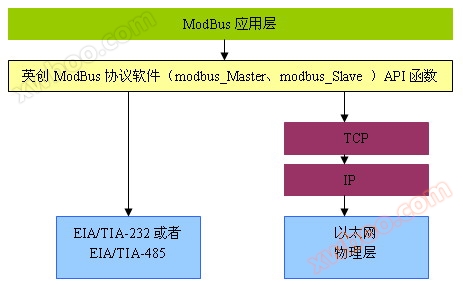
Communication diagram of Yingchuang ModBus protocol software
Function codes supported by Yingchuang ModBus protocol software
function code |
description |
1 |
Read a single coil |
2 |
Read discrete input |
3 |
Read multiple registers |
4 |
Read input register |
5 |
Write a single coil |
6 |
Write a single register |
15 |
write multiple coils |
16 |
Write multiple registers |
22 |
Mask write register |
23 |
Read/Write Register |
Basic usage of software
In order to facilitate the use of applications and maintain consistent code forms for different communication media, the API functions in the ModBus protocol software provided by Innolux (including modbus_Saster and modbus_Slave) can support both serial port and TCP based Modbus protocols. Applications only need to distinguish between different parameters when calling initialization functions. For parameter descriptions, please refer to the corresponding header files: modbus_Saster. h and modbus_Slave. h
1. Application of modbus_Saster
As an application of Modbus client mode, it mainly prepares requests and sends them to server devices, and waits for the server's response. When developing such applications, users can refer to Modbus standard literature and the communication interface data manual of the controlled device, and directly call the modbus_Saster software package provided by Innolux to provide corresponding API functions for accessing and controlling server devices. When developing such applications, users only need to include modbus_master. h/modbus_master. lib.
2. Application of modbus_Slave
As an application of ModBus server mode, it mainly requires the analysis and response of ModBus application messages, but this is only a part of the entire communication of ModBus. Another part is the access to application data, which needs to be defined by users themselves. For the convenience of customers, the modbus_Slave software package has implemented automatic loading of these user interface functions through function pointers, linking user application data processing with ModBus application message responses. Users only need to define these interface functions according to their needs to implement the corresponding functions, and the specific definitions of each function are implemented through a dedicated CPP file: DataManager. cpp.
It can be seen that in the development of such applications, two parts need to be included: one is the API functions defined by modbus_stlave. h/modbus_stlave. lib; The other part is the user data interface functions defined by DATAProvider. h/DATAProvider. cpp, where the interface functions need to be specifically implemented by the user in DATAProvider. cpp.
In order to respond to ModBus application messages in a timely manner, it should be noted that a thread should be designed during program design to repeatedly call the modbus_Slave execution function, which is in blocking mode.
For example:
(1) Activate Modbus Device Protocol
hPort = mbusSlave_StartupServer( _T('*'), 1, 10000, mbusSlave_Interface );
or
hPort=mbusSlave_StartupServer( _T('COM3:9600-8-1-0'),1,10000, mbusSlave_Interface );
(2) Call the execution function Serverloop in the thread to respond to the request
while( 1 )
{
//Call the execution function for analyzing and responding to ModBus messages.
result = mbusSlave_ServerLoop( hPort );
if( result!=0 )//Check if an error is returned
{
//Error handling: This example is to obtain and print the text information of the error code
wcscpy( szText, mbusSlave_GetErrorText( result ) );
i1 = wcslen(szText );
if( i1>0 )
{
wcstombs( strText, szText, i1 );
printf(' error code: %s!\ \n'Stretex);
}
}
}
Previously, the ModBus communication protocol software provided by Yingchuang Company was provided to customers in the form of C functions and static libraries (modbus.lib or libmodbus.a files). With more and more customers using it, Innolux has pre installed the ModBus communication protocol, especially the master control protocol software (abbreviated as modbus_Saster), in the form of a dynamic library (modbus_Saster. dll or libmbusmaster. so file) into the Innolux embedded industrial control motherboard kernel system to facilitate the calling of customer applications. Industrial control motherboards pre installed with Modbus protocol include all motherboards in the Innolux ESM series (ESM6802, ESM6800, ESM335x, ESM928x, etc.).
Related reference materials
| Application scheme for 4-20mA current loop acquisition | Modbus Master Communication Protocol Software under WinCE | |
| Modbus Device Protocol Software under WinCE | Yingchuang embedded Linux industrial control motherboard supports Modbus master protocol software | |
| Introduction to Modbus Device Protocol Software in Linux | ESM6802 supports Qt MODBUS program development | |
| Pre install Modbus communication protocol in the Yingchuang motherboard |
Online inquiry
-
Contacts
-
Company
-
Telephone
-
Email
-
WeChat
-
Verification Code
-
Message Content
-