
VIP member

Intelligent fog cannon machine
The spray machine is composed of impeller, air duct, deflector, spray device and bracket. It adopts a new high-strength aluminum alloy impeller, high-
Product details
Intelligent Fog Cannon User Manual
Hello user! Thank you very much for purchasing and using our series of environmentally friendly air driven long-range spray. In order to enable you to use this product proficiently, this user manual will provide a detailed introduction to the main purpose, performance, maintenance, and usage methods of this product. Please be sure to read the manual before use for proper operation and use.1、 Product Introduction
The spray machine is composed of impeller, air duct, deflector, spray device and bracket. It adopts a new high-strength aluminum alloy impeller, high-performance deflector and new motor support structure. The fan has high efficiency, stable atomization, large range of fog volume adjustment, uniform droplet diameter, easy operation and long service life. Our company has multiple high-tech R&D personnel who specialize in designing, absorbing advanced technologies from both domestic and foreign sources, and independently designing and developing high-quality, high-tech new products based on national environmental protection and dust removal needs. They are the latest dust removal equipment to solve PM2.5 air quality exceeding standards.
2、 Main structure and function:


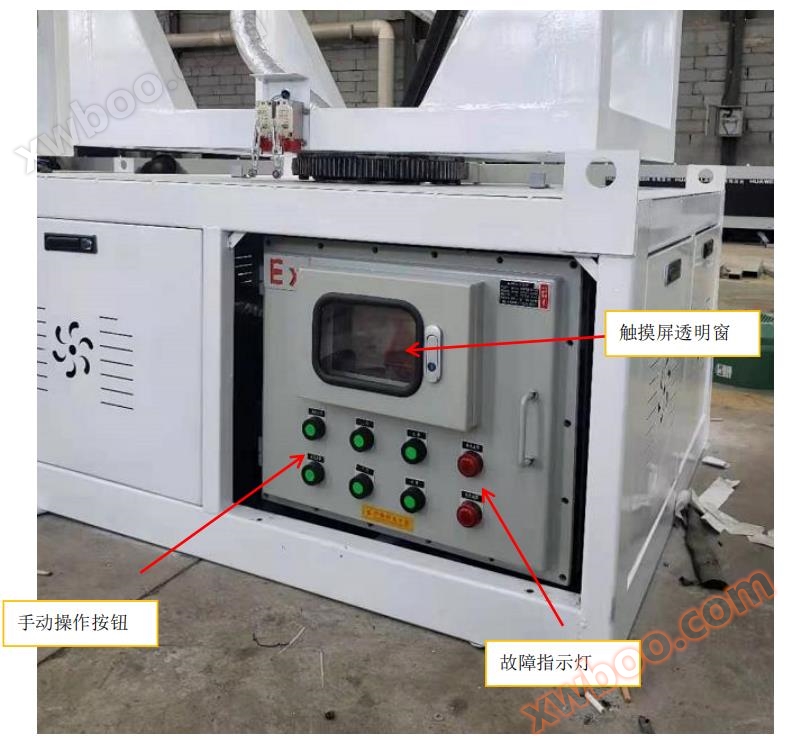


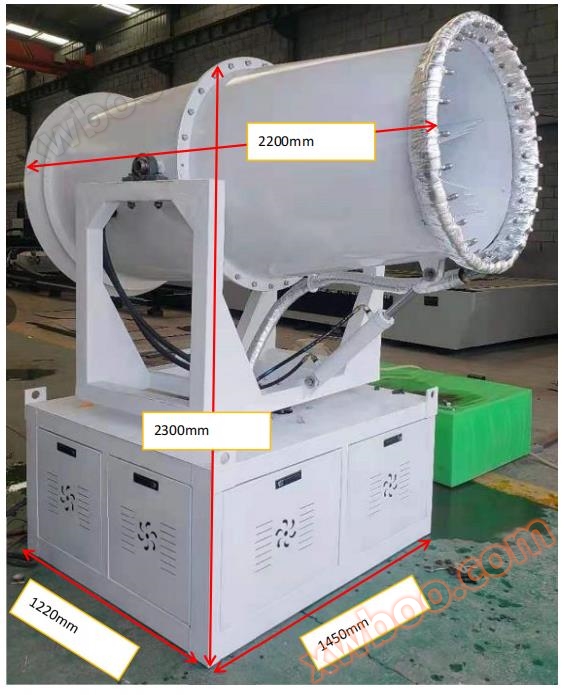
4、 Main performance parameters
1. Input power supply voltage: three-phase four wire AC380 ± 10%, 50Hz;
2. Input power capacity: 32kw (AC);
3. Insulation resistance range: 1000M Ω with an accuracy of 5%;
4. Pipe network control temperature: 45 ℃; The factory set startup temperature is 0 ℃, and the shutdown temperature is 5 ℃;
5、 Operation and troubleshooting methods:
1. Before operation, carefully check whether there are any leaks in each pipeline system and whether there are any loose connections at each pipeline interface; Are there any short circuits or loose electrical components. If everything is normal, the experiment can be conducted.
2. The device is powered on for about 8 seconds and can run the test,
3. Panel operation test:

Run the fan first:
1) The start and stop of the fan is achieved through a button. When the fan is in a stopped state, pressing the start and stop button will execute a voltage reduction start mode (star delta or soft start). When the fan reaches a certain speed, the system will automatically switch to a delta operation state (power frequency operation state) without manual conversion,
2) If the fan is in operation, pressing this button will immediately power off the fan (disconnect the fan triangle or star contactor). During trial operation, please pay attention to whether the fan is running in the correct direction (from the air inlet to the nozzle direction). If the direction is incorrect, please stop the fan immediately and cut off the power switch in the power switch cabinet. Swap the online positions A and B of the main power switch for the fog cannon machine.

3) If the wind direction of the fan is normal and there is no abnormal noise, then come and test the water pump! The operation of the water pump is the same as the previous operation method, but there is no need to pay attention to the issue of forward and reverse rotation, as they have been debugged before leaving the factory. The water pump has a pressure detection function. When the equipment is powered on, the system will automatically detect whether the water pressure detection switch is in the on state. If it is not, an alarm will be immediately triggered (the water shortage fault indicator light on the distribution cabinet panel will light up, and the touch screen will display the alarm information and the mobile APP will also display the alarm information). The system will prohibit all actions, and the main power switch of the fog cannon machine will be online
4) At the same time as the pump is started, the water pressure detection will delay for about 30 seconds to check the pressure switch again. If there is a pressure detection switch, it will be disconnected. If it is still in the disconnected state after 30 seconds, it means that there is no water output, and the system will immediately stop all outputs and display an alarm state. 5) Once the system has a water shortage alarm, it must be powered off, the fault must be dealt with, and power must be restored before the alarm state can be restored.


3) Up and down motion test, which refers to the testing of the tilt angle. The up and down motion is in jog mode. After pressing the up button, the system will immediately start the oil pump and connect the up relay, causing the up solenoid valve to be powered on, and the system will perform the up motion. After releasing the up button, the system will immediately disconnect the power supply of the up relay and stop the up action. The oil pump stops after a delay of 3-5 seconds. The descent action is consistent with the same as above.
4) Left and right movement test,
1) When the left turn button is pressed, the system will immediately execute the left turn action. When the left limit switch touches the limit collision block, it will stop immediately, with a delay of 1-3 seconds, and the system will reverse direction (rotate to the right). When the right limit switch touches the limit collision block, it will stop immediately, with a delay of 1-3 seconds, and the system will reverse direction again (rotate to the left).
2) When the right turn button is pressed, the system performs the same action as before
3) Stop left and right movements: When the system is executing a left or right turn, simply press the left or right turn button, and the system will immediately stop the left and right movements. Remote control operation introduction:

1) First, press the emergency stop button,
2) Press the power button once to operate it
3) If the above two steps are not successful, the status indicator light will flash red when any operation key is pressed. If successful, the green light will be displayed
4) The operation process of the remote control is consistent with the buttons on the distribution cabinet panel.
Introduction to Mobile Monitoring and Control:
1) This software only supports Android phones.
2) Ask the business manager of our company to retrieve the software.
3) Software installation. Display this icon after installation is complete.


Online inquiry
-
Contacts
-
Company
-
Telephone
-
Email
-
WeChat
-
Verification Code
-
Message Content
-